Xero

Xero

Xero

Convert deals into Xero invoices and track revenue in Pipedrive. Avoid errors, save time, and automate invoicing with Pipedrive Xero integration.

Convert deals into Xero invoices and track revenue in Pipedrive. Avoid errors, save time, and automate invoicing with Pipedrive Xero integration.

Perfect for:

Perfect for:

Finance Managers streamlining billing processes

Finance Managers streamlining billing processes

Xero

Xero

Email support

Email support

Setup Guide

Setup Guide

Book a demo

Book a demo

Integration features

Integration features

Xero
Xero
Xero

Automatic Deal-to-Invoice/Order Creation: Save Time & Money

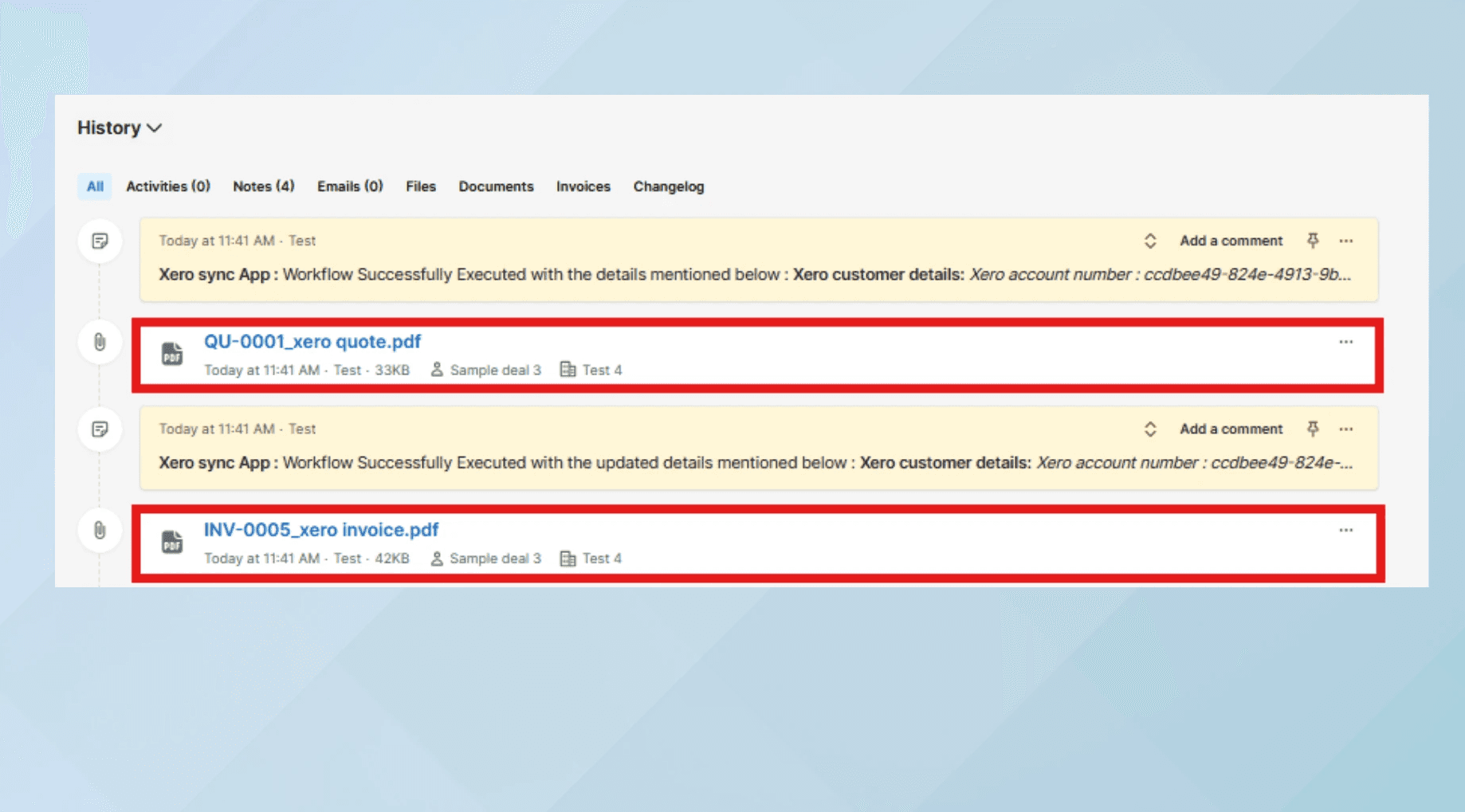
  • Quickly convert Pipedrive deals into invoices or quotes with real-time status updates in deal notes, reducing accounting dependencies and boosting sales efficiency.
  • Quickly convert Pipedrive deals into invoices or quotes with real-time status updates in deal notes, reducing accounting dependencies and boosting sales efficiency.

  • Quickly convert Pipedrive deals into invoices or quotes with real-time status updates in deal notes, reducing accounting dependencies and boosting sales efficiency.

xero
xero
xero

One-click Invoice

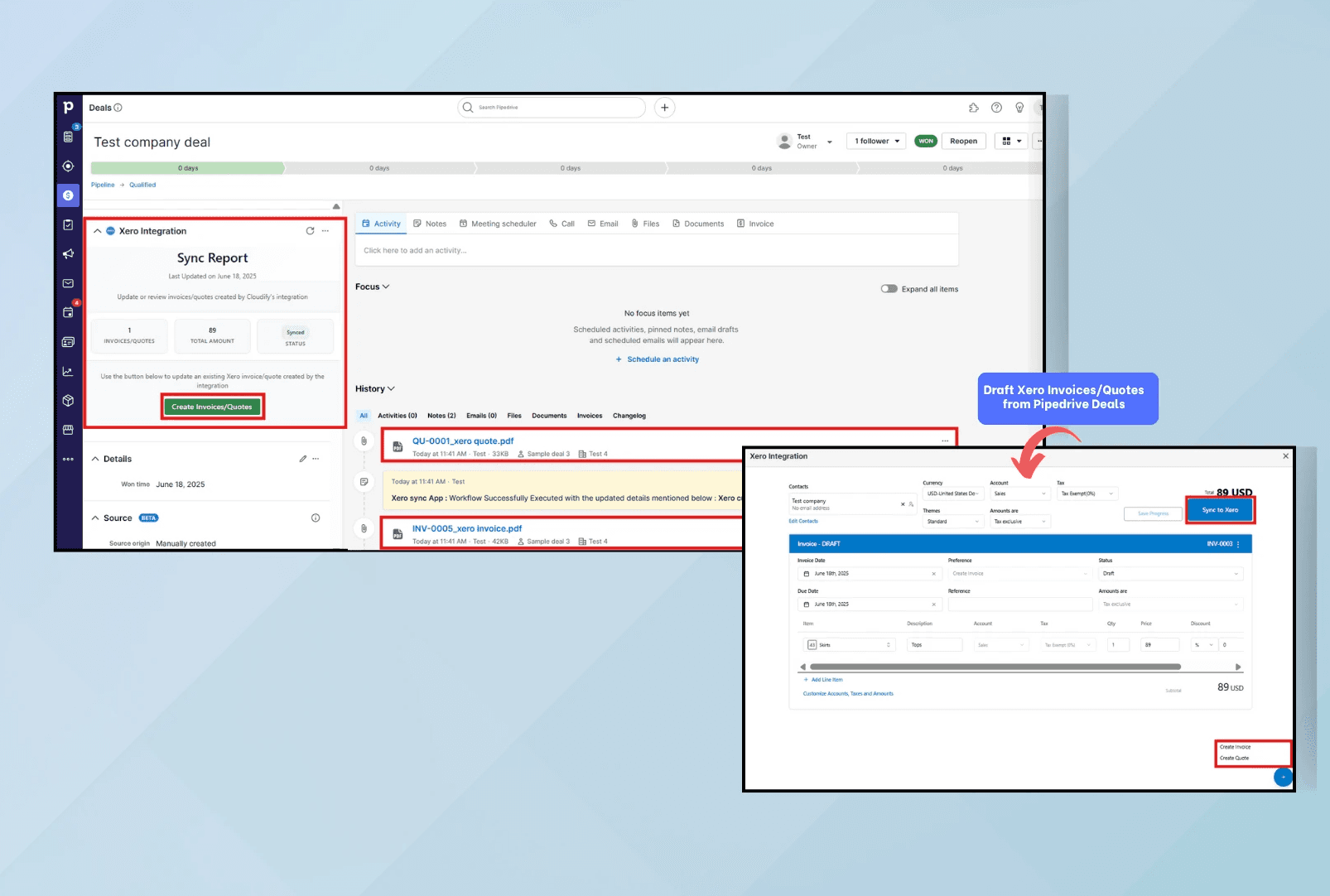
  • Create, update and customize Xero invoices from any stage of a Pipedrive Deal with flexible options for managing line items, taxes, and accounts.
  • Create, update and customize Xero invoices from any stage of a Pipedrive Deal with flexible options for managing line items, taxes, and accounts.

  • Create, update and customize Xero invoices from any stage of a Pipedrive Deal with flexible options for managing line items, taxes, and accounts.

Xero
Xero
Xero

Replay Failed Syncs

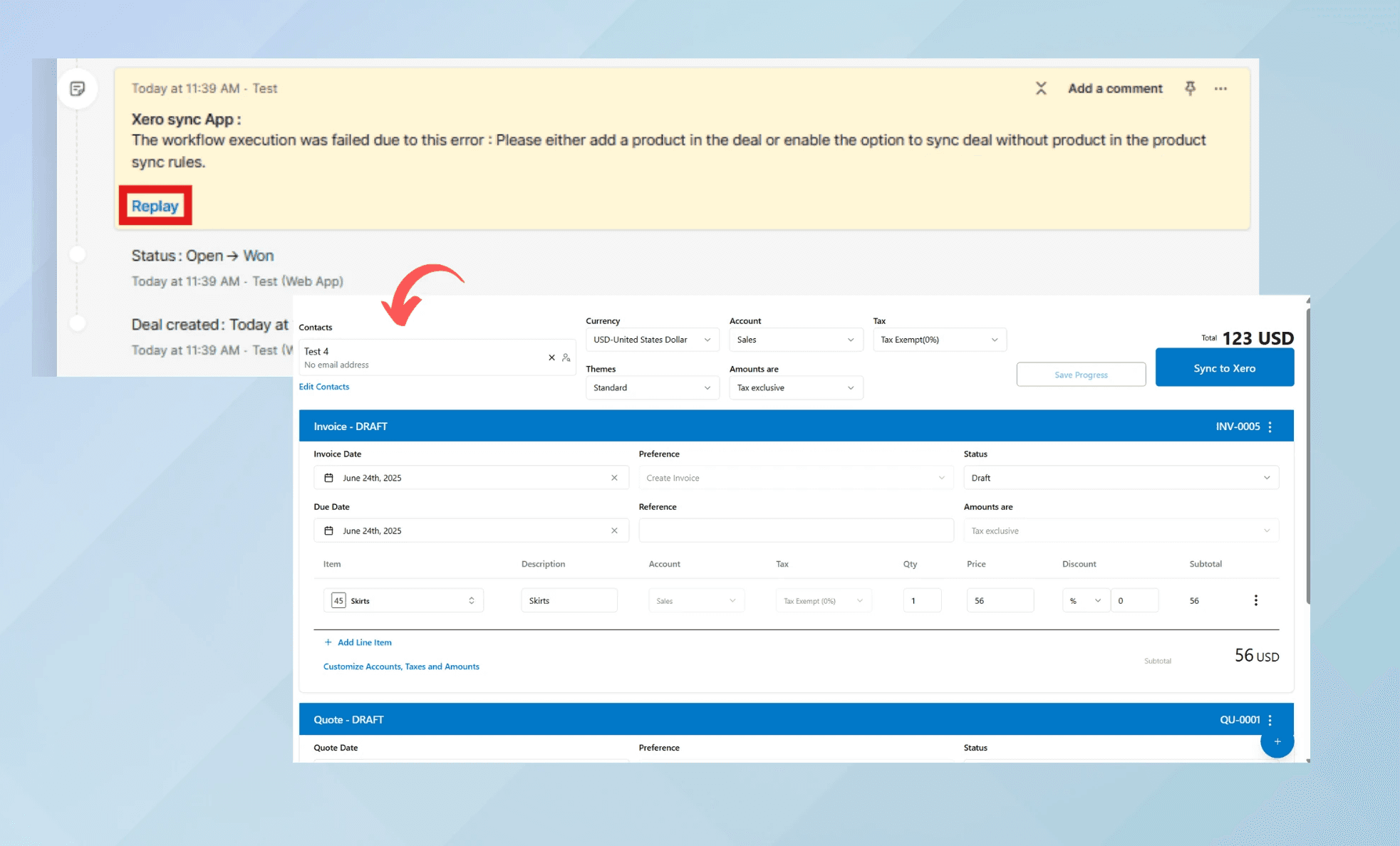
  • The Replay feature in deal notes ensures that every Xero invoice is created successfully, helping to keep your sales process running smoothly by recovering from any failed integrations.

  • The Replay feature in deal notes ensures that every Xero invoice is created successfully, helping to keep your sales process running smoothly by recovering from any failed integrations.

  • The Replay feature in deal notes ensures that every Xero invoice is created successfully, helping to keep your sales process running smoothly by recovering from any failed integrations.

Pricing

Pricing

Pricing

Simple Pricing, Powerful Features

Simple Pricing, Powerful Features

Features

Price

Create companies, products & invoices/orders from HubSpot → e-conomic

Custom rules & mapping for creating customers & invoices in e-conomic

Replay failed sync from HubSpot activity log

Unlimited manual company sync

Unlimited company & financial data update from e-conomic

Custom rules & mapping for creating customers in e-conomic

Create invoices/orders & products from HubSpot → e-conomic @ 1 DKK/sync

Custom rules & mapping for companies, products & invoices/orders

Custom integration build & tailored workflows

Dedicated implementation support

One-time setup fee (as applicable) + transaction-based monthly fee

Trial

$0

/month

Basic

$15

/month

Premium

$30

/month

Custom

Get a quote

Features

Price

Create companies, products & invoices/orders from HubSpot → e-conomic

Custom rules & mapping for creating customers & invoices in e-conomic

Replay failed sync from HubSpot activity log

Unlimited manual company sync

Unlimited company & financial data update from e-conomic

Custom rules & mapping for creating customers in e-conomic

Create invoices/orders & products from HubSpot → e-conomic @ 1 DKK/sync

Custom rules & mapping for companies, products & invoices/orders

Custom integration build & tailored workflows

Dedicated implementation support

One-time setup fee (as applicable) + transaction-based monthly fee

Trial

$0

/month

Basic

$15

/month

Premium

$30

/month

Custom

Get a quote

Features

Price

Create companies, products & invoices/orders from HubSpot → e-conomic

Custom rules & mapping for creating customers & invoices in e-conomic

Replay failed sync from HubSpot activity log

Unlimited manual company sync

Unlimited company & financial data update from e-conomic

Custom rules & mapping for creating customers in e-conomic

Create invoices/orders & products from HubSpot → e-conomic @ 1 DKK/sync

Custom rules & mapping for companies, products & invoices/orders

Custom integration build & tailored workflows

Dedicated implementation support

One-time setup fee (as applicable) + transaction-based monthly fee

Trial

$0

/month

Basic

$15

/month

Premium

$30

/month

Custom

Get a quote

FAQ

FAQ

FAQ

Here are the answers to your questions

Here are the answers to your questions

After reading this section, if you still has questions,
feel free to contact us however you want.

After reading this section, if you still has questions,
feel free to contact us however you want.

What exactly does this integration do?

This integration helps you:

  • Convert your Pipedrive deals into Xero invoices or quotes

  • Synchronize your Pipedrive and Xero product and customer data

  • View financial information directly in Pipedrive

  • Customize invoice/quote details including taxes and discountsTrack sync status in your deal activities

What exactly does this integration do?

This integration helps you:

  • Convert your Pipedrive deals into Xero invoices or quotes

  • Synchronize your Pipedrive and Xero product and customer data

  • View financial information directly in Pipedrive

  • Customize invoice/quote details including taxes and discountsTrack sync status in your deal activities

What exactly does this integration do?

This integration helps you:

  • Convert your Pipedrive deals into Xero invoices or quotes

  • Synchronize your Pipedrive and Xero product and customer data

  • View financial information directly in Pipedrive

  • Customize invoice/quote details including taxes and discountsTrack sync status in your deal activities

Can I set up the integration myself?

Yes, you can set up the integration on your own. The process is straightforward and well-documented. For detailed instructions, please refer to our Integration Setup Guide.


Can I set up the integration myself?

Yes, you can set up the integration on your own. The process is straightforward and well-documented. For detailed instructions, please refer to our Integration Setup Guide.


Can I set up the integration myself?

Yes, you can set up the integration on your own. The process is straightforward and well-documented. For detailed instructions, please refer to our Integration Setup Guide.


I need a custom integration plan that fits my business requirements. Do you provide that?

We provide custom integration plans that include a one-time setup fee as applicable and a monthly fee based on the transactions. The integration will be built based on your business flows and requirements. Furthermore, you will have dedicated support for implementation.

I need a custom integration plan that fits my business requirements. Do you provide that?

We provide custom integration plans that include a one-time setup fee as applicable and a monthly fee based on the transactions. The integration will be built based on your business flows and requirements. Furthermore, you will have dedicated support for implementation.

I need a custom integration plan that fits my business requirements. Do you provide that?

We provide custom integration plans that include a one-time setup fee as applicable and a monthly fee based on the transactions. The integration will be built based on your business flows and requirements. Furthermore, you will have dedicated support for implementation.

How do I control when invoices/quotes are created?

You can configure which deal stages trigger invoice/quote creation in the app settings. This allows you to precisely control at which stages of your process the documents are generated.

How do I control when invoices/quotes are created?

You can configure which deal stages trigger invoice/quote creation in the app settings. This allows you to precisely control at which stages of your process the documents are generated.

How do I control when invoices/quotes are created?

You can configure which deal stages trigger invoice/quote creation in the app settings. This allows you to precisely control at which stages of your process the documents are generated.